What Is IPTV and How Does It Work? — Complete Beginner’s Guide 2026
What Is IPTV?
IPTV stands for Internet Protocol Television. It is a method of delivering television programming over an internet connection instead of relying exclusively on traditional broadcast, cable, or satellite television systems.
With IPTV, television content is transmitted through IP-based networks and can be accessed using compatible devices and applications. Depending on the service, IPTV can provide access to live TV, movies, series, sports, news, documentaries, and video-on-demand content.
Unlike traditional television, where programming is often delivered through cable lines, satellite signals, or terrestrial broadcasts, IPTV uses an internet connection to deliver content to your device.
This makes IPTV particularly interesting for viewers who want more flexibility in where and how they watch television.
In this complete beginner’s guide, we’ll explain:
- What IPTV means
- How IPTV works
- How IPTV differs from cable and satellite TV
- What you need to use IPTV
- Which devices support IPTV
- How IPTV streaming works
- What internet speed you need
- What IPTV apps do
- What M3U and EPG mean
- How to choose an IPTV subscription
- Common IPTV problems and solutions
- IPTV legality and content rights
- Frequently asked questions about IPTV
What Does IPTV Stand For?
IPTV means Internet Protocol Television.
Let’s break the term down:
Internet Protocol
Internet Protocol, commonly called IP, is a set of communication rules used to transfer data across networks.
The same basic networking technology powers many of the internet services people use every day.
Television
Television refers to video programming delivered to viewers.
Put together, Internet Protocol Television means television content delivered using internet protocol networks.
It does not necessarily mean that you watch television through a traditional web browser. IPTV can be delivered through dedicated applications, Smart TV apps, set-top boxes, streaming devices, or other compatible software and hardware.
How Does IPTV Work?
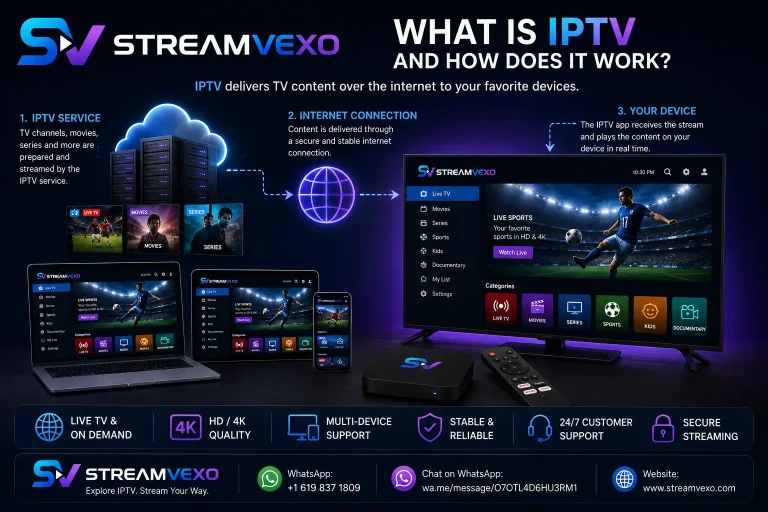
At a basic level, IPTV works by transmitting video content through an IP network to a compatible device.
The process can be explained in several stages.
1. Content is prepared
Television programming first needs to be prepared for digital delivery.
This can include live television broadcasts, recorded programs, movies, series, sports, or other video content.
2. Content is encoded
Video is compressed and encoded into formats suitable for streaming.
Compression helps reduce the amount of data required to transmit video over the network.
3. Content is delivered through an IP network
The video is distributed through internet-based infrastructure.
Depending on the service, the content may be delivered through different streaming technologies and network architectures.
4. Your IPTV application connects to the service
Your compatible IPTV application or player receives the information needed to access available streams.
The exact process depends on the provider and application.
5. Your device displays the video
The application receives and processes the stream before displaying the content on your television, computer, smartphone, tablet, or another compatible device.
The entire process happens quickly, allowing the viewer to watch streaming content without manually downloading the entire video first.
IPTV vs Traditional Television
One of the easiest ways to understand IPTV is to compare it with traditional television.
| Feature | IPTV | Cable TV | Satellite TV |
|---|---|---|---|
| Delivery | IP network | Cable infrastructure | Satellite signal |
| Internet connection | Usually required | Not necessarily | Not necessarily |
| Smart devices | Often supported | Depends on provider | Depends on provider |
| On-demand content | Often available | Often available | Often available |
| Mobility | Depends on service/device | More limited | More limited |
| Installation | Usually app/device setup | Cable installation | Satellite equipment |
IPTV does not automatically mean “better” than cable or satellite. Each technology has advantages and limitations.
The main difference is how the television content reaches the viewer.
What Is an IPTV Service?
An IPTV service is a service that provides television or video content using an IP-based delivery system.
Depending on the service, it may include different categories such as:
- Live television
- Movies
- TV series
- Sports
- News
- Children’s programming
- Documentaries
- International channels
- Video-on-demand
The exact content depends entirely on the specific service and the rights it has to distribute that content.
When comparing IPTV services, users should therefore look beyond the advertised number of channels.
What Is an IPTV Subscription?
An IPTV subscription is a paid plan that provides access to an IPTV service for a defined period.
Subscription periods can vary depending on the provider and may include options such as:
- Monthly plans
- Multi-month plans
- Annual plans
- Other subscription periods
Before purchasing, always review the provider’s pricing, renewal, cancellation, refund, device, and content information.
If you’re interested in learning how to compare IPTV plans, see our [IPTV Subscription Guide].
What Do You Need to Use IPTV?
Getting started with IPTV generally requires a few basic things.
1. Internet Connection
Because IPTV uses IP networks, you need an internet connection capable of handling the video stream.
Your required speed depends on:
- Video resolution
- Compression
- Network stability
- Number of simultaneous streams
- Other household internet activity
2. Compatible Device
You need a device capable of running the IPTV application or receiving the IPTV stream.
Examples include:
- Smart TV
- Firestick
- Android TV
- Apple TV
- MAG device
- Chromecast
- Smartphone
- Tablet
- Windows PC
- Mac
3. IPTV Application or Player
Depending on the service, you may need a compatible IPTV application.
An IPTV player generally provides the interface used to organize and display your IPTV content.
4. IPTV Service Credentials or Connection Information
Your provider may supply information such as login credentials, a playlist URL, portal information, or another supported connection method.
The exact setup depends on the IPTV service and application.
IPTV Apps vs IPTV Services: What’s the Difference?
This is one of the most common sources of confusion for beginners.
An IPTV service provides the content or access to the content.
An IPTV application/player is the software used to display compatible IPTV content.
Think of it like this:
IPTV Service → provides access to content
IPTV Player → displays the content
Installing an IPTV application by itself does not necessarily give you access to television channels.
You generally need an authorized content source or service compatible with the application.
What Devices Can You Use With IPTV?
One of the biggest advantages of internet-based television is the variety of compatible devices.
IPTV on Smart TVs
Many modern Smart TVs can run compatible IPTV applications.
Popular Smart TV platforms include devices from manufacturers such as:
Compatibility depends on the specific TV model, operating system, application, and IPTV service.
IPTV on Firestick
Amazon Fire TV devices are widely used for streaming.
A compatible IPTV application can allow users to access their IPTV service through their television.
Before subscribing, confirm that the IPTV service and application you intend to use support your specific Fire TV device.
Related guide: IPTV for Firestick
IPTV on Apple TV
Apple TV can provide a convenient way to access compatible IPTV applications on a television.
Users should check the App Store and the IPTV provider’s current compatibility information before subscribing.
Related guide: IPTV for Apple TV
IPTV on Android TV
Android TV and Google TV devices support a broad range of streaming applications.
Depending on the IPTV service, users may be able to install a compatible player and configure their service credentials.
Related guide: IPTV for Android TV
IPTV on MAG Devices
MAG devices are dedicated set-top boxes that can support IPTV services using portal-based configurations.
Setup normally requires the portal information supplied by the service provider.
Related guide: IPTV for MAG Devices
IPTV on Roku
Roku uses its own application ecosystem, so compatibility should be checked carefully.
Not every IPTV application or service works on every Roku device.
Always verify current compatibility before purchasing an IPTV subscription specifically for Roku.
IPTV on Chromecast
Chromecast can be used with compatible applications and supported casting methods.
The exact setup depends on your Chromecast generation, mobile device, application, and IPTV service.
IPTV on PC and Mac
You can also watch IPTV on a computer.
Depending on the service and application, IPTV may work on:
- Windows
- macOS
- Laptops
- Desktop computers
This can be useful when traveling or when you prefer watching content on your computer rather than a television.
What Is IPTV Live TV?
Live IPTV refers to television content delivered over an IP network while the program is being broadcast.
For example, a live channel may transmit a news program, sports event, or television show at the scheduled broadcast time.
The experience is similar to traditional live television, but the content is delivered through an internet-based connection.
What Is IPTV Video on Demand?
Video on demand, commonly called VOD, allows viewers to select content and watch it when they choose.
Instead of following a fixed broadcast schedule, the viewer selects available content from a library.
Depending on the service, VOD may include:
- Movies
- TV series
- Documentaries
- Children’s content
- Other recorded programming
Availability depends on the specific service and its content rights.
What Is an IPTV M3U Playlist?
An M3U playlist is a file or URL format that can contain references to multimedia streams.
Some IPTV services provide an M3U URL that can be entered into a compatible IPTV application.
The application reads the playlist and uses the information to organize available streams.
An M3U playlist itself is not necessarily a television service. It is a way of describing or referencing media streams.
Only use playlists and streams that you are authorized to access.
What Is an IPTV EPG?
EPG stands for Electronic Program Guide.
An EPG provides program information similar to a traditional television guide.
Depending on the service, an EPG may display:
- Channel names
- Current programs
- Upcoming programs
- Program times
- Program descriptions
A properly configured EPG can make a large IPTV channel list much easier to navigate.
What Internet Speed Do You Need for IPTV?
Internet speed is an important factor in IPTV performance.
As a general starting point:
| Video Quality | Suggested Minimum Starting Point |
|---|---|
| SD | Around 5 Mbps |
| HD | Around 10 Mbps |
| Full HD | Around 15 Mbps |
| 4K | Around 25 Mbps |
These numbers are practical guidelines, not guarantees.
Actual performance depends on the video bitrate, network quality, Wi-Fi signal, device, provider infrastructure, and other activity on your network.
If multiple people are streaming simultaneously, additional bandwidth may be necessary.
For a better IPTV experience:
- Use a stable broadband connection.
- Use Ethernet when possible.
- Use a strong 5 GHz Wi-Fi connection when Ethernet is unavailable.
- Reduce unnecessary downloads during streaming.
- Keep your device software updated.
- Restart your router if you experience temporary connection problems.
Why Does IPTV Buffer?
Buffering happens when the device cannot receive and process video data quickly enough to maintain continuous playback.
There can be many causes.
Common causes include:
Slow internet: Your connection may not provide enough bandwidth.
Weak Wi-Fi: Distance or interference can reduce network performance.
Network congestion: Other devices may be consuming significant bandwidth.
Device limitations: Older hardware may struggle with high-resolution video.
Application issues: The IPTV application may need updating or troubleshooting.
Provider-side issues: A particular stream may be experiencing technical problems.
If several streaming services are buffering, test your internet connection.
If only one IPTV stream is affected, the problem may be specific to that stream or service.
IPTV Quality: SD, HD, Full HD, and 4K
IPTV services can provide video at different resolutions.
SD
Standard Definition uses less bandwidth and can be useful on slower connections.
HD
High Definition provides a clearer picture and is common for television streaming.
Full HD
Full HD offers greater detail than standard HD and requires more bandwidth.
4K
4K provides significantly higher image resolution but requires suitable content, hardware, and network performance.
A service advertising 4K does not necessarily mean every channel is available in native 4K.
Always check the actual resolution offered for the content you want to watch.
What Is the Difference Between IPTV and Streaming Services?
IPTV and online streaming services can appear similar because both use internet connections, but they can refer to different types of services.
Traditional IPTV often focuses on television-style delivery, including live channels and electronic program guides.
On-demand streaming platforms primarily focus on individual movies, series, and other content selected by the viewer.
There can be overlap between the two.
The important thing is to understand what type of content and viewing experience a particular service provides.
Is IPTV Legal?
This question requires an important distinction.
IPTV technology itself is a method of delivering video content over IP networks and is not inherently illegal.
The legality of a particular IPTV service depends on factors such as the content being distributed, the provider’s rights, and the laws applicable in the relevant jurisdiction.
For this reason, consumers should choose services that are authorized to provide the content they offer.
Always review the provider’s terms and information about content rights where applicable, and follow the laws in your country.
IPTV Around the World
IPTV is used by viewers across many markets, but content preferences can vary significantly by region.
IPTV in the USA
US viewers may prioritize:
- Local programming
- News
- Sports
- Entertainment
- Movies
- International channels
IPTV in Canada
Canadian viewers may be interested in Canadian programming combined with US and international content.
IPTV in the UK
UK viewers may prioritize British television, entertainment, sports, news, and international programming.
IPTV in Europe
Europe is not a single television market.
Viewers in France, Germany, Spain, Italy, the Netherlands, Sweden, Denmark, Norway, Portugal, Belgium, and other countries can have different language and programming requirements.
This makes it important to evaluate an IPTV service according to your specific location and viewing preferences.
How to Choose an IPTV Service
If you’re considering an IPTV subscription, don’t make your decision based solely on the number of channels advertised.
Instead, evaluate the entire service.
1. Check the content
Make sure the channels and programming you actually want are available.
2. Check device compatibility
Confirm that your preferred Smart TV, streaming device, computer, or set-top box is supported.
3. Evaluate quality
Check what resolutions are available and whether they match your internet connection and device.
4. Consider reliability
Look for information about service stability and support.
5. Review subscription terms
Understand the plan duration, price, renewal terms, cancellation process, and refund policy.
6. Check customer support
A clear support channel is important if you encounter setup or technical problems.
7. Review content authorization
Choose services that have the appropriate rights to distribute the content they offer.
Common IPTV Problems and How to Fix Them
IPTV Isn’t Loading
Try:
- Check your internet connection.
- Restart the IPTV application.
- Restart your streaming device.
- Check your service credentials.
- Verify whether the service is experiencing an outage.
IPTV Is Buffering
Try:
- Run an internet speed test.
- Move closer to the Wi-Fi router.
- Use Ethernet if possible.
- Stop unnecessary downloads.
- Restart your router.
- Test another stream.
EPG Is Not Showing
Check:
- Whether the EPG is supported
- EPG configuration
- Time-zone settings
- Application settings
- Provider information
IPTV App Keeps Crashing
Try:
- Updating the application
- Restarting the device
- Clearing application data where supported
- Reinstalling the application
- Checking device storage
Is IPTV Worth It in 2026?
Whether IPTV is worth it depends on your viewing habits.
IPTV can be attractive if you:
- Prefer internet-based television
- Want access across compatible devices
- Already have reliable broadband
- Want live and on-demand viewing options
- Prefer flexible viewing environments
However, it is not automatically the best choice for everyone.
Compare IPTV with traditional cable, satellite television, and mainstream streaming platforms based on your content needs, budget, internet connection, and preferred devices.
IPTV Setup: A Simple Beginner Process
Although the exact setup varies, the general process looks like this:
Step 1: Choose your device
Select your Smart TV, Firestick, Apple TV, Android TV device, MAG box, computer, or another compatible device.
Step 2: Choose an IPTV application
Install a compatible IPTV player from an official or trusted source.
Step 3: Get an authorized IPTV service
Choose a service that provides the content you are authorized to access.
Step 4: Enter your connection information
Depending on the service, you may need a username and password, M3U playlist, portal URL, or another supported configuration.
Step 5: Load your channels
The IPTV application may then display your available channels, VOD library, categories, and EPG.
Step 6: Test playback
Open several channels and test the service on your device and network.
For device-specific instructions, see the StreamVexo IPTV Setup Guide.
Advantages of IPTV
IPTV can provide several benefits.
Flexible viewing
You can use compatible devices in different rooms or locations.
Internet-based delivery
Television content is delivered through an IP network rather than requiring traditional cable or satellite infrastructure.
Device variety
Depending on the service, IPTV can work with Smart TVs, streaming devices, computers, and other hardware.
Live and on-demand content
Some services combine live television with VOD libraries.
Electronic program guides
EPG functionality can make channel navigation easier.
Potential IPTV Limitations
IPTV also has limitations.
Internet dependency
A reliable internet connection is important.
Network problems
Wi-Fi interference or congestion can affect playback.
Device compatibility
Not every application works on every device.
Content availability
Channels and programs vary between services and countries.
Legal considerations
The provider must have appropriate rights to distribute the content it offers.
Understanding these limitations helps you make a better purchasing decision.
Frequently Asked Questions About IPTV
What is IPTV in simple terms?
IPTV is television delivered over an internet-based network instead of traditional television delivery methods such as cable, satellite, or terrestrial broadcasting.
Does IPTV require internet?
Yes, IPTV generally requires a network connection capable of receiving the streaming content.
Can I use IPTV on a Smart TV?
Yes, compatible IPTV applications and services can work on many Smart TVs. Compatibility depends on your TV model, operating system, application, and provider.
Can I use IPTV on Firestick?
Many IPTV services can work with compatible Fire TV devices and applications. Check compatibility before subscribing.
Can IPTV work on Apple TV?
Yes, compatible IPTV applications can provide IPTV access on Apple TV. Availability depends on the current application and service.
What is an IPTV player?
An IPTV player is software designed to display compatible IPTV streams or playlists.
Is an IPTV player the same as an IPTV service?
No. The player is the application used to display content, while the IPTV service provides access to the content.
What is an M3U IPTV playlist?
An M3U playlist is a file or URL containing references to media streams that can be loaded by compatible applications.
What does EPG mean in IPTV?
EPG means Electronic Program Guide. It provides information about current and upcoming television programs.
Does IPTV support 4K?
Some IPTV services provide 4K content, but actual availability depends on the service, source content, device, application, and internet connection.
Why is my IPTV buffering?
Buffering can be caused by internet speed, Wi-Fi problems, network congestion, device limitations, application issues, or problems with the specific stream.
Is IPTV legal?
IPTV technology itself is not inherently illegal. The legality of a particular service depends on the content it distributes and whether it has the necessary rights to provide that content.
Final Thoughts
So, what is IPTV?
IPTV is a technology that allows television and video content to be delivered through IP-based networks.
Instead of relying exclusively on traditional cable, satellite, or terrestrial broadcasting, IPTV uses internet-based infrastructure to deliver content to compatible devices.
For beginners, the most important things to understand are simple:
IPTV is the technology.
The IPTV service provides the content.
The IPTV player displays the content.
Your internet connection delivers the data to your device.
Whether you’re in the United States, Canada, the UK, Europe, or another part of the world, choosing the right IPTV service requires looking at content, device compatibility, streaming quality, reliability, subscription terms, and content authorization.
If you’re ready to explore IPTV further, start with the StreamVexo IPTV Subscription Guide and then choose the setup guide for your preferred device.
Explore StreamVexo
Learn more about IPTV streaming, subscriptions, compatible devices, and setup guides with StreamVexo.
📲 WhatsApp: +1 619 837 1809
💬 WhatsApp: Chat with StreamVexo on WhatsApp
🌐 Website: StreamVexo.com
StreamVexo — Explore IPTV. Stream Your Way.
