

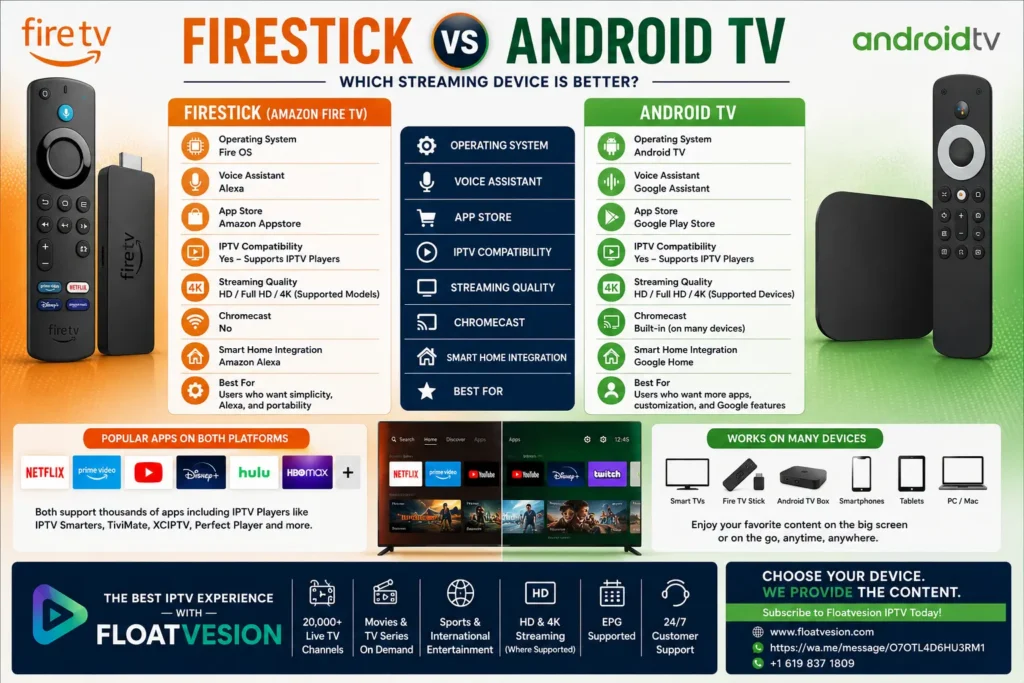
Firestick vs Android TV: Which Streaming Device Is Better?
Streaming devices have transformed the way people watch television, movies, sports, and on-demand content. Among the most popular options are the Amazon Fire TV Stick (Firestick) and Android TVdevices. Both offer access to a wide range of streaming apps, including IPTV players, making them excellent choices for modern entertainment.
If you’re deciding between Firestick vs Android TV, understanding their differences in performance, app support, interface, and compatibility can help you make the right decision.
In this guide, we’ll compare these two platforms to help you choose the streaming device that best matches your viewing habits.
What Is Amazon Firestick?
Amazon Firestick is a compact streaming device that plugs into your television’s HDMI port. It runs Amazon’s Fire OS, allowing users to stream movies, TV shows, live television, music, and other digital content through compatible applications.
Popular Firestick features include:
- Access to streaming apps
- Voice control with Alexa
- HD and 4K support (device dependent)
- Compact design
- Wi-Fi connectivity
- App downloads through the Amazon Appstore
- Support for IPTV player applications
Firestick is designed for users who want a simple and portable streaming solution.
What Is Android TV?
Android TV is Google’s television operating system, available on many Smart TVs and dedicated streaming devices. It provides access to entertainment apps through the Google Play Store and supports voice search using Google Assistant on compatible devices.
Common Android TV features include:
- Google Play Store
- Chromecast built-in (on many devices)
- Voice search
- Wide app selection
- Smart home integration
- HD and 4K streaming support
- IPTV player compatibility
Android TV is available on televisions from multiple manufacturers as well as standalone streaming boxes.
Firestick vs Android TV: Key Differences
Although both platforms provide excellent streaming experiences, they differ in ecosystem, interface, and customization.
| Feature | Firestick | Android TV |
|---|---|---|
| Operating System | Fire OS | Android TV |
| Voice Assistant | Alexa | Google Assistant |
| App Store | Amazon Appstore | Google Play Store |
| IPTV Player Support | ✔ Yes | ✔ Yes |
| HD Streaming | ✔ Yes | ✔ Yes |
| 4K Support | Supported models | Supported devices |
| Voice Search | ✔ Yes | ✔ Yes |
| Chromecast | No | Often built-in |
| Smart Home Integration | Amazon Alexa | Google Home |
Performance
Performance depends on the hardware model, available storage, processor, RAM, and internet connection.
Firestick
Firestick devices are optimized for Amazon’s ecosystem and provide a smooth experience for:
- Streaming movies
- Live TV
- IPTV players
- Music
- Popular streaming services
Performance varies between Fire TV Stick Lite, Fire TV Stick, Fire TV Stick 4K, and Fire TV Cube models.
Android TV
Android TV performance depends on the television or streaming device manufacturer.
Higher-end Android TV devices generally provide:
- Fast navigation
- Responsive menus
- Smooth multitasking
- Efficient app switching
Premium hardware often delivers the best experience.
App Availability
One of the biggest advantages of both platforms is their support for streaming applications.
Firestick Supports
- Streaming services
- Music apps
- IPTV player applications
- Utility apps
- Gaming apps
Applications are available through the Amazon Appstore.
Android TV Supports
Android TV offers access to thousands of applications through the Google Play Store, including:
- Entertainment apps
- IPTV players
- Music services
- Educational apps
- Fitness apps
- Games
Some applications may be available on one platform before the other.
IPTV Compatibility
Both Firestick and Android TV are widely used for IPTV streaming.
Compatible IPTV player applications may include:
- IPTV Smarters
- TiviMate
- XCIPTV
- Perfect Player
- IPTV Pro
- Other supported IPTV applications
Your IPTV provider determines the login method and available features.
Streaming Quality
Both platforms support high-quality video playback, depending on the device model and streaming service.
Supported formats may include:
- SD
- HD
- Full HD
- 4K Ultra HD (supported models)
- HDR (supported models)
A stable internet connection is essential for smooth playback.
Ease of Use
Firestick
Firestick offers a simple interface designed for quick access to apps, recent content, and Alexa voice commands.
Many users appreciate its plug-and-play setup process.
Android TV
Android TV features a customizable home screen with personalized recommendations, Google Assistant integration, and Chromecast functionality on many devices.
Users invested in Google’s ecosystem often find Android TV especially convenient.
Firestick vs Android TV: Pros and Cons
Both Firestick and Android TV provide excellent streaming experiences, but each platform has strengths that appeal to different users.
Firestick Advantages
✔ Compact and portable design
✔ Quick installation through an HDMI port
✔ Alexa voice control
✔ Smooth performance on supported models
✔ Large selection of streaming apps
✔ Supports many IPTV player applications
✔ Regular software updates
✔ Easy-to-use interface
Firestick Considerations
- Uses the Amazon Appstore instead of Google Play.
- Some Android applications may not be available natively.
- Available features vary depending on the Firestick model.
Android TV Advantages
✔ Google Play Store access
✔ Google Assistant integration
✔ Chromecast built into many devices
✔ Broad application compatibility
✔ Customizable home screen
✔ Works across many TV brands and streaming boxes
✔ Excellent IPTV player compatibility
Android TV Considerations
- Performance depends on the TV or streaming device hardware.
- User experience can vary between manufacturers.
- Software updates may differ depending on the device brand.
Firestick vs Android TV Feature Comparison
| Feature | Firestick | Android TV |
|---|---|---|
| Live TV Apps | ✔ Yes | ✔ Yes |
| IPTV Player Support | ✔ Yes | ✔ Yes |
| Movies & TV Series | ✔ Yes | ✔ Yes |
| Voice Assistant | Alexa | Google Assistant |
| App Store | Amazon Appstore | Google Play Store |
| Chromecast | No | Often Built-in |
| Smart Home Integration | Amazon Alexa | Google Home |
| HD Streaming | ✔ Yes | ✔ Yes |
| 4K Streaming | Supported Models | Supported Devices |
| HDR Support | Supported Models | Supported Devices |
| Gaming Apps | ✔ Yes | ✔ Yes |
| Bluetooth Support | ✔ Yes | ✔ Yes |
| Wi-Fi Connectivity | ✔ Yes | ✔ Yes |
Which Device Is Better for IPTV?
One of the most common questions among streaming enthusiasts is whether Firestick or Android TV is better for IPTV.
The good news is that both platforms support many popular IPTV player applications, making either a solid choice.
Popular IPTV players available on compatible devices include:
The overall experience depends more on:
- Your IPTV subscription
- Internet connection
- Device specifications
- IPTV player application
A high-quality IPTV provider combined with a capable streaming device generally delivers the best results.
Supported Devices
Firestick Family
Amazon offers several Fire TV devices, including:
- Fire TV Stick Lite
- Fire TV Stick
- Fire TV Stick 4K
- Fire TV Stick 4K Max
- Fire TV Cube
Each model offers different levels of performance and features.
Android TV Devices
Android TV is available on numerous products, including:
- Android TV Smart TVs
- Google TV devices
- NVIDIA Shield TV
- Chromecast with Google TV
- Android TV streaming boxes
The experience can vary depending on the hardware and manufacturer.
Which Platform Is Easier to Use?
Firestick
Firestick is ideal for users looking for:
- Simple setup
- Easy navigation
- Voice search with Alexa
- A straightforward interface
- A compact streaming device
Its plug-and-play design makes it accessible for beginners.
Android TV
Android TV may appeal more to users who:
- Prefer Google’s ecosystem
- Want Google Assistant integration
- Use Chromecast regularly
- Like a customizable home screen
- Need access to a wide range of apps through Google Play
Which One Should You Choose?
There isn’t a single “best” option for everyone. Your ideal choice depends on your needs.
Choose Firestick If You:
- Prefer Amazon’s ecosystem.
- Want a compact, portable streaming device.
- Enjoy using Alexa voice commands.
- Need a simple installation process.
- Frequently travel and want to take your streaming device with you.
Choose Android TV If You:
- Use Google services regularly.
- Want access to the Google Play Store.
- Prefer Chromecast functionality.
- Enjoy customizing your home screen.
- Plan to install a wide variety of applications.
Why Your IPTV Subscription Matters
While choosing the right streaming device is important, the quality of your IPTV subscription often has a greater impact on your viewing experience.
A dependable IPTV provider can offer:
- Stable streaming
- Broad device compatibility
- Electronic Program Guide (EPG)
- Video on Demand (VOD)
- Responsive customer support
- Easy setup with compatible IPTV players
Whether you use Firestick or Android TV, pairing your device with a reliable IPTV subscription can help you get the most from your streaming setup.
Why Choose Floatvesion?
Looking for an IPTV subscription that works seamlessly across popular streaming devices?
Floatvesion offers IPTV subscriptions designed for compatibility with many leading IPTV player applications on Firestick, Android TV, Smart TVs, smartphones, tablets, Windows PCs, and Mac computers.
Why Viewers Choose Floatvesion
✅ Extensive live TV channels
✅ Movies & TV Series
✅ Sports entertainment
✅ Video on Demand (VOD)
✅ HD & 4K streaming (where supported)
✅ Support for IPTV Smarters, TiviMate, XCIPTV, and other compatible IPTV players
✅ Fast activation
✅ Responsive customer support
Start Streaming with Floatvesion Today
Whether you choose Firestick or Android TV, Floatvesion can help you enjoy a flexible IPTV experience across your favorite compatible devices.
Contact Floatvesion
🌐 Website: https://www.floatvesion.com
📲 WhatsApp: https://wa.me/message/O7OTL4D6HU3RM1
📞 WhatsApp: +1 619 837 1809
Explore subscription options and find the IPTV plan that matches your entertainment preferences.
Frequently Asked Questions
Is Firestick better than Android TV for IPTV?
Both platforms support many popular IPTV player applications. The overall experience depends on your IPTV provider, internet connection, and device specifications.
Can I install IPTV apps on Firestick?
Yes. Firestick supports many IPTV player applications that work with compatible IPTV subscriptions.
Does Android TV support IPTV?
Yes. Android TV supports a wide variety of IPTV player applications available through the Google Play Store or other supported installation methods.
Which device is faster?
Performance varies by model. Premium Firestick and Android TV devices generally provide faster navigation and smoother streaming than entry-level models.
Which platform has more apps?
Android TV typically offers a larger selection of applications through the Google Play Store, while Firestick provides access to a broad range of apps through the Amazon Appstore.
Can I watch 4K content?
Yes, provided you have a compatible device, a supported streaming service, and sufficient internet speed.
Which platform is easier for beginners?
Many users find Firestick easier to set up due to its simple plug-and-play design. Android TV offers more customization but may require additional setup depending on the device.
Can I use the same IPTV subscription on both platforms?
Many IPTV providers support multiple compatible devices and applications. Confirm supported devices and login methods with your IPTV provider.
Conclusion
When comparing Firestick vs Android TV, both platforms deliver an excellent streaming experience and support a wide range of entertainment applications, including IPTV players.
If you value portability, a straightforward interface, and Alexa integration, Firestick is a great option. If you prefer Google’s ecosystem, extensive app availability, Chromecast, and greater customization, Android TV may be the better fit.
Regardless of which platform you choose, pairing it with a reliable IPTV subscription is key to enjoying live TV, sports, movies, and on-demand entertainment across your devices.
🚀 Upgrade Your Streaming Experience with Floatvesion
Ready to get more from your streaming device?
With Floatvesion, you can enjoy:
✔ Extensive Live TV Channels
✔ Movies & TV Series
✔ Sports Entertainment
✔ Video on Demand (VOD)
✔ HD & 4K Streaming (where supported)
✔ Compatibility with Firestick, Android TV, Smart TVs, smartphones, tablets, Windows PCs, and Macs
✔ Fast activation and responsive customer support
Contact Floatvesion Today
🌐 Website: https://www.floatvesion.com
📲 WhatsApp: https://wa.me/message/O7OTL4D6HU3RM1
📞 WhatsApp: +1 619 837 1809
Explore Floatvesion today and discover an IPTV subscription designed to work with your favorite streaming device.
Note: Firestick and Android TV are streaming platforms that support compatible applications. IPTV services require a separate subscription from a provider. Always use IPTV services that have the appropriate rights or licenses to distribute the content they offer and comply with the laws and regulations in your region.
