

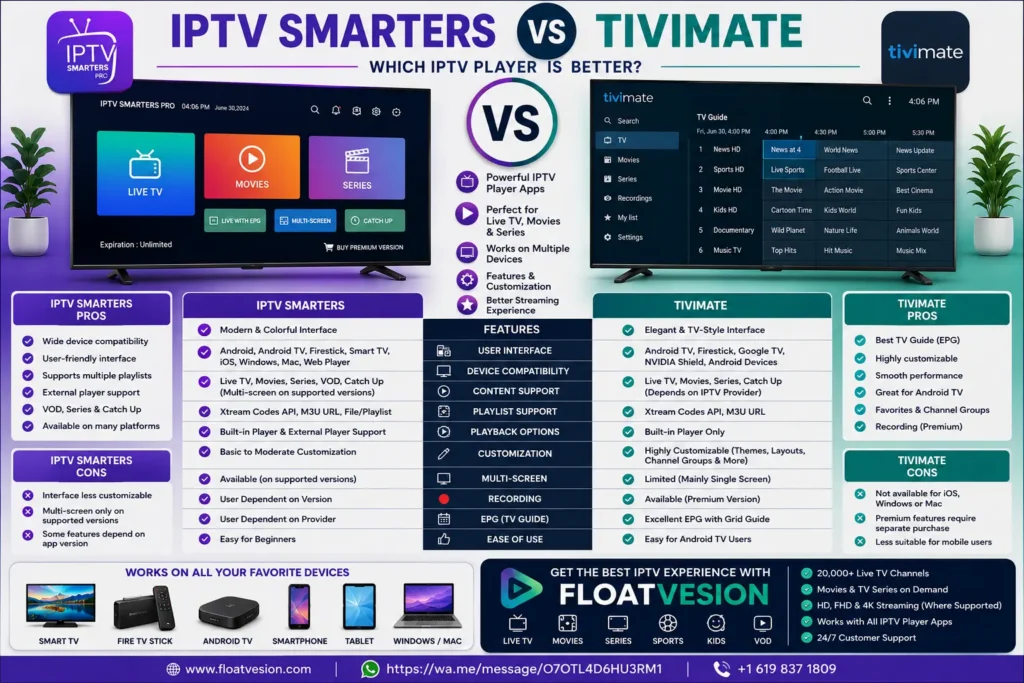
IPTV Smarters vs TiviMate: Which IPTV Player Is Better?
Choosing the right IPTV player can make a significant difference in your streaming experience. While an IPTV subscription provides access to television content, an IPTV player is the application that organizes and displays that content on your device.
Among the many IPTV players available today, IPTV Smarters and TiviMate are two of the most widely used options. Both applications support IPTV playlists and electronic program guides, but they differ in their interface, features, customization options, and supported platforms.
If you’re comparing IPTV Smarters vs TiviMate, this guide will help you understand their strengths, limitations, and which player may be the better choice for your streaming preferences.
What Is IPTV Smarters?
IPTV Smarters is an IPTV player application that allows users to access IPTV services provided by their chosen subscription provider. The application itself does not supply television channels or content—it simply provides an interface for viewing content from an existing IPTV subscription.
Common features include:
- Live TV playback
- Movies
- TV series
- Electronic Program Guide (EPG)
- Video on Demand (VOD)
- Multi-screen support (on supported versions)
- Favorites management
- Search functionality
- External player compatibility
The exact feature set may vary depending on the version of the application and the IPTV service being used.
What Is TiviMate?
TiviMate is another IPTV player designed primarily for Android TV-based devices. Like IPTV Smarters, it does not provide content but works with IPTV subscriptions by organizing playlists into a television-style interface.
Popular features include:
- Live TV playback
- TV Guide (EPG)
- Favorites
- Search
- Channel grouping
- Catch-up support (when provided by the IPTV service)
- Recording support (on supported versions)
- Custom playlists
- Interface personalization
Available features depend on the version of the application and the IPTV provider.
IPTV Smarters vs TiviMate: Key Differences
Although both applications are IPTV players, they focus on different user experiences.
| Feature | IPTV Smarters | TiviMate |
|---|---|---|
| Live TV | ✔ Yes | ✔ Yes |
| Movies | ✔ Yes | ✔ Yes |
| TV Series | ✔ Yes | ✔ Yes |
| Electronic Program Guide | ✔ Yes | ✔ Yes |
| Favorites | ✔ Yes | ✔ Yes |
| Search | ✔ Yes | ✔ Yes |
| Catch-up Support | Provider dependent | Provider dependent |
| Multi-Screen | Available on supported versions | Limited |
| Interface Customization | Moderate | Extensive |
| Recording | Version dependent | Version dependent |
User Interface Comparison
The interface plays an important role in everyday streaming.
IPTV Smarters
IPTV Smarters offers a clean layout with separate sections for:
- Live TV
- Movies
- TV Series
- Catch-up (where available)
- Favorites
Its menu structure is straightforward and suitable for users who prefer a familiar streaming experience.
TiviMate
TiviMate is designed to resemble a traditional television interface.
It features:
- Large TV Guide
- Smooth channel navigation
- Customizable layouts
- Quick channel switching
- Modern interface
Many Android TV users appreciate its television-like viewing experience.
Device Compatibility
Compatibility is another important factor when selecting an IPTV player.
IPTV Smarters Supports
Support varies by version.
TiviMate Supports
TiviMate is primarily developed for:
It is focused mainly on Android TV environments.
Playback Features
Both IPTV players support common playback features, including:
- Live TV
- Movies
- TV series
- Electronic Program Guide
- Favorites
- Search
Additional capabilities such as recording, catch-up TV, or multi-screen viewing depend on the application version and whether the IPTV service supports those functions.
Performance
Performance depends on several factors, including your IPTV provider, internet connection, device hardware, and the player application.
Both IPTV Smarters and TiviMate are generally designed to provide smooth playback when used with compatible devices and a reliable IPTV subscription.
Customization
One of the main differences between these applications is the level of interface customization.
IPTV Smarters
Offers:
- Basic personalization
- Favorites
- Layout organization
- External player support
TiviMate
Provides additional customization such as:
- Channel ordering
- Interface themes
- TV Guide adjustments
- Menu personalization
- Display preferences
Many users who enjoy tailoring their viewing experience appreciate these additional options.
IPTV Smarters vs TiviMate: Pros and Cons
Both IPTV Smarters and TiviMate are capable IPTV player applications, but each appeals to different types of users. Understanding their strengths and limitations can help you decide which one better matches your viewing habits.
IPTV Smarters Advantages
✔ User-friendly interface
✔ Supports live TV, movies, and TV series
✔ Electronic Program Guide (EPG)
✔ Video on Demand (VOD)
✔ Multi-screen support on compatible versions
✔ Compatible with a wide range of devices
✔ Simple setup process
✔ External player support
IPTV Smarters Considerations
- Available features depend on the application version.
- Some advanced options may not be available on every platform.
- Performance depends on your IPTV provider and device.
TiviMate Advantages
✔ Modern television-style interface
✔ Excellent Electronic Program Guide (EPG)
✔ Fast channel navigation
✔ Highly customizable layout
✔ Favorites and channel grouping
✔ Recording support on supported versions
✔ Designed for Android TV devices
TiviMate Considerations
- Primarily focused on Android TV platforms.
- Some advanced features are available only in premium versions.
- Functionality depends on the IPTV service being used.
IPTV Smarters vs TiviMate Comparison Table
| Feature | IPTV Smarters | TiviMate |
|---|---|---|
| Live TV | ✔ Yes | ✔ Yes |
| Movies | ✔ Yes | ✔ Yes |
| TV Series | ✔ Yes | ✔ Yes |
| Video on Demand | ✔ Yes | ✔ Yes |
| Electronic Program Guide | ✔ Yes | ✔ Yes |
| Favorites | ✔ Yes | ✔ Yes |
| Search | ✔ Yes | ✔ Yes |
| Multi-Screen | ✔ Supported on some versions | Limited |
| Recording | Version dependent | Version dependent |
| Catch-up TV | Provider dependent | Provider dependent |
| Interface Customization | Moderate | Extensive |
| Android TV | ✔ Yes | ✔ Excellent |
| Fire TV Stick | ✔ Yes | ✔ Yes |
| Smart TVs | ✔ Yes | ✔ Android TV-based models |
| Windows | ✔ Yes | Not officially supported |
| macOS | ✔ Yes | Not officially supported |
| iPhone & iPad | ✔ Yes | No |
Ease of Installation
Both applications are relatively straightforward to set up.
IPTV Smarters Setup
Typically involves:
- Install the application.
- Open the app.
- Enter your IPTV subscription details (such as Xtream Codes API, M3U playlist, or other supported login method provided by your IPTV provider).
- Load your channels.
- Start streaming.
TiviMate Setup
Generally follows these steps:
- Install TiviMate.
- Add your IPTV playlist.
- Import the Electronic Program Guide (EPG).
- Organize channels and favorites.
- Begin watching live TV.
The exact setup process may vary depending on your IPTV provider.
Which IPTV Player Performs Better?
Performance depends on several factors:
- Internet speed
- IPTV provider quality
- Device specifications
- Application version
- Playlist size
Both IPTV Smarters and TiviMate can deliver smooth playback when paired with a stable internet connection and a reliable IPTV subscription.
Rather than one player being universally “better,” the experience often depends on your preferred device and desired features.
Which IPTV Player Should You Choose?
The right IPTV player depends on how you plan to stream.
Choose IPTV Smarters If You:
- Want support across multiple operating systems.
- Watch on smartphones, tablets, Windows PCs, or Macs.
- Prefer an easy-to-use interface.
- Like having movies, TV series, and live TV organized in one application.
- Need compatibility with various IPTV login methods.
Choose TiviMate If You:
- Primarily use Android TV or Google TV.
- Prefer a television-style channel guide.
- Enjoy customizing your viewing experience.
- Frequently organize favorites and channel groups.
- Want an interface designed specifically for large-screen TVs.
Why Your IPTV Provider Matters More Than the Player
Although selecting a good IPTV player is important, the overall streaming experience depends even more on the IPTV provider.
A quality provider can offer:
- Stable streams
- Responsive customer support
- Broad device compatibility
- Regular playlist updates
- Electronic Program Guide support
- Video on Demand (where available)
Using an excellent player with an unreliable IPTV service may still result in a poor experience. Choosing a dependable IPTV provider is just as important as choosing the right application.
Why Choose Floatvesion?
No matter which IPTV player you prefer, you’ll need a reliable IPTV subscription to enjoy live television and on-demand entertainment.
Floatvesionoffers IPTV subscriptions designed to work with many popular IPTV player applications, helping you stream on your favorite compatible devices.
With Floatvesion You Can Enjoy
✅ Live TV channels
✅ Movies & TV Series
✅ Sports entertainment
✅ Video on Demand (VOD)
✅ HD & 4K streaming (where supported)
✅ Electronic Program Guide support (where available)
✅ Compatibility with IPTV Smarters, TiviMate, and other popular IPTV players
✅ Smart TV, Android TV, Fire TV Stick, smartphones, tablets, Windows PCs, and Mac compatibility
✅ Responsive customer support
Start Streaming with Floatvesion Today
Looking for a dependable IPTV subscription?
Floatvesion makes it easy to start streaming with your preferred IPTV player.
🌐 Website: https://www.floatvesion.com
📲 WhatsApp: https://wa.me/message/O7OTL4D6HU3RM1
📞 WhatsApp: +1 619 837 1809
Whether you choose IPTV Smarters or TiviMate, Floatvesion can help you enjoy a smooth streaming experience across compatible devices.
Frequently Asked Questions
Is IPTV Smarters better than TiviMate?
Neither application is objectively better for every user. IPTV Smarters offers broad platform compatibility, while TiviMate is especially popular among Android TV users for its television-style interface and customization features.
Do IPTV Smarters and TiviMate include TV channels?
No. Both applications are IPTV players only. They do not provide television channels or content. You’ll need an IPTV subscription from a provider to access programming.
Can I use the same IPTV subscription with both applications?
Many IPTV subscriptions support multiple compatible IPTV players. Check with your IPTV provider to confirm supported login methods and applications.
Which IPTV player is better for Android TV?
TiviMate is widely recognized for its Android TV-focused interface, while IPTV Smarters also works well on Android TV and supports additional operating systems.
Does IPTV Smarters work on iPhone?
Yes. IPTV Smarters offers versions compatible with iOS devices, subject to platform availability.
Can I install TiviMate on Fire TV Stick?
Yes. TiviMate is commonly used on Amazon Fire TV devices and Android TV-based streaming hardware.
Which IPTV player is easier for beginners?
Many new users find IPTV Smarters straightforward thanks to its organized interface and simple navigation. Others may prefer TiviMate if they primarily watch television on Android TV devices.
Does the IPTV player affect streaming quality?
The IPTV player contributes to the user experience, but streaming quality is influenced more by your internet connection, device performance, and the quality of your IPTV provider.
Conclusion
When comparing IPTV Smarters vs TiviMate, both are feature-rich IPTV player applications that can deliver an excellent streaming experience when paired with a reliable IPTV subscription.
If you want an application that works across multiple operating systems with an intuitive interface, IPTV Smarters is a strong choice. If you primarily stream on Android TV and value advanced customization with a television-style experience, TiviMate may better suit your preferences.
Ultimately, the best IPTV player is the one that fits your devices, viewing habits, and desired features. Pair it with a dependable IPTV provider to get the most from your streaming setup.
🚀 Stream with Confidence Using Floatvesion
Choosing the right IPTV player is only part of the equation. A reliable IPTV subscription helps ensure a better streaming experience.
With Floatvesion, you can enjoy:
✔ Extensive Live TV Channels
✔ Movies & TV Series
✔ Sports Entertainment
✔ Video on Demand (VOD)
✔ HD & 4K Streaming (where supported)
✔ Compatibility with IPTV Smarters, TiviMate, Smart TVs, Fire TV Stick, Android TV, smartphones, tablets, Windows PCs, and Macs
✔ Fast activation and responsive customer support
Contact Floatvesion Today
🌐 Website: https://www.floatvesion.com
📲 WhatsApp: https://wa.me/message/O7OTL4D6HU3RM1
📞 WhatsApp: +1 619 837 1809
Explore Floatvesion today and find an IPTV subscription that works seamlessly with your preferred IPTV player.
Note: IPTV Smarters and TiviMate are IPTV player applications and do not provide television channels or media content. Always use IPTV services that have the appropriate rights or licenses to distribute the content they offer and comply with the laws applicable in your region.
