
Best IPTV Apps 2026: 10 Essential Features for Smooth Streaming
Introduction to IPTV Apps
Streaming television has changed considerably in recent years. Instead of relying only on traditional cable, satellite, or terrestrial broadcasting, viewers can now access legitimate internet-delivered television services through compatible devices and applications.
That makes choosing the right IPTV player increasingly important.
The phrase Best IPTV Apps 2026 can refer to many different types of applications. Some are simple media players, while others offer advanced features for playlists, electronic program guides, video-on-demand libraries, favorites, subtitles, parental controls, and casting.
One important point often gets overlooked: an IPTV app and an IPTV service aren’t necessarily the same thing. An app may simply provide the interface used to play content from a provider. The availability and legality of channels depend on the content provider and the rights it holds.
This guide explains how IPTV apps work, what features matter most, how to choose an application for different devices, how to troubleshoot common issues, and how to make your streaming setup more convenient.
What Is an IPTV App?
An IPTV app is software designed to play television or video content delivered through an internet connection.
Depending on the application, it may support different playlist formats, login systems, or content sources.
Typical IPTV-player features include:
- Live TV playback
- Video on Demand
- Electronic Program Guide
- Playlist management
- Favorites
- Search
- Categories
- Subtitles
- Multiple audio tracks
- Parental controls
- Casting support
The exact features vary from one application to another.
IPTV App vs IPTV Service
This distinction is crucial when comparing the Best IPTV Apps 2026.
An IPTV app is the software used to access and organize compatible streams.
An IPTV service is the source that provides the television programming.
For example, installing an IPTV player doesn’t automatically give you licensed television channels. You generally need a compatible content source or subscription.
Think of the app as the television interface and the service as the content provider.
How IPTV Players Work
An IPTV player connects to a compatible source and organizes the available content into categories.
Depending on the setup, you may see sections such as:
- Live TV
- Sports
- Movies
- Series
- News
- Kids
- VOD
- Favorites
Some apps can also load an EPG, which provides information about scheduled programming.
Why IPTV Apps Are Popular in 2026
Multi-Device Streaming
One of the biggest advantages of modern IPTV applications is their wide device support.
Depending on the app, users may be able to stream on:
- Android smartphones
- Android TV
- Smart TVs
- Fire TV devices
- Tablets
- Apple TV
- MAG Boxes
- Windows computers
- Mac computers
Before choosing an app, always confirm that it supports your specific device and operating system.
Flexible Viewing
IPTV apps make it possible to organize content in a single interface instead of switching between multiple sources.
For example, a compatible app may place live television, movies, and series in separate sections.
This makes finding content much easier.
Easy Content Organization
Large playlists can become difficult to navigate without proper organization.
Good IPTV applications help by providing:
- Categories
- Search
- Favorites
- Recently watched sections
- EPG
- VOD categories
A clean interface can make a surprisingly big difference.
Best IPTV Apps 2026: What Makes an App Good?
1. User-Friendly Interface
A good IPTV app should be easy to understand.
Menus should be clear, navigation should feel natural, and frequently used features shouldn’t be buried under unnecessary settings.
A useful interface typically includes:
- Clear categories
- Simple channel navigation
- Search
- Favorites
- Program information
- Playback controls
2. Playlist Support
Playlist compatibility is one of the most important considerations.
Different IPTV services can use different access methods and formats. An application may support one format but not another.
Before installing an app, check whether it supports the format or login method provided by your legitimate IPTV service.
3. EPG Integration
The Electronic Program Guide helps users see what is currently playing and what’s coming next.
A good EPG can provide:
- Program names
- Start and end times
- Descriptions
- Channel schedules
- Program categories
For people who watch a lot of live TV, this feature can be essential.
4. VOD Support
If you watch movies and series, look for an IPTV player that supports VOD.
A well-designed VOD interface can organize content by:
- Genre
- Release year
- Language
- Category
- Favorites
The exact metadata depends on the content source.
5. Favorites and Search
Searching through hundreds or thousands of channels can be frustrating.
Favorites let you create a personalized channel list, while search lets you find specific content quickly.
These simple features can save a lot of time.
IPTV Apps for Android Smartphones
Android smartphones are among the most flexible IPTV devices available.
A compatible IPTV application can turn a phone into a portable streaming screen.
When selecting an Android IPTV player, consider:
- Android version compatibility
- Google Play availability
- Playlist support
- EPG support
- VOD support
- Casting options
- Subtitle support
- App permissions
- Developer reputation
It’s generally safer to obtain applications from official stores or verified developer sources rather than downloading random APK files from unknown websites.
IPTV Apps for Smart TVs
Smart TVs provide a more traditional television experience while retaining the flexibility of internet streaming.
Before installing an IPTV app on your Smart TV, check:
- TV operating system
- Available app store
- Application compatibility
- Remote-control support
- Playlist support
- EPG functionality
Some televisions have limited storage or processing resources, so lightweight applications can sometimes provide a better experience.
IPTV Apps for Fire TV and Streaming Devices
Streaming devices are popular because they can add smart-TV capabilities to compatible televisions.
When choosing an IPTV player for a streaming device, look for:
- Remote-friendly navigation
- Fast loading
- Playlist support
- EPG
- VOD
- Favorites
- Search
- Stable playback
Avoid applications that require unnecessary permissions or come from questionable sources.
IPTV Apps for MAG Boxes
MAG Boxes are designed specifically for IPTV-style television environments and are commonly controlled with a remote.
The setup process can differ from smartphone or Smart TV applications.
A MAG-based setup may involve portal information supplied by the service provider.
When using a MAG Box, make sure:
- Your device is connected to the internet.
- Your subscription is active.
- The portal information is entered correctly.
- Your provider supports MAG devices.
- The content source is legally authorized.
Because the interface is designed around traditional television navigation, MAG Boxes can be convenient for viewers who prefer a dedicated set-top box.
Internet Requirements
Your IPTV app can’t compensate for a poor internet connection.
As a general guide:
| Streaming Quality | Approximate Recommended Speed |
|---|---|
| SD | 5 Mbps+ |
| HD | 10–15 Mbps+ |
| Full HD | 15–20 Mbps+ |
| 4K | 25 Mbps+ |
Actual requirements vary according to bitrate, compression, network congestion, and the content provider.
If multiple devices are streaming simultaneously, you may need significantly more bandwidth.
Best IPTV Apps 2026: Top Apps to Consider
Choosing an IPTV player depends heavily on your device and the features you need. Instead of focusing only on the number of channels advertised by an IPTV provider, it’s worth choosing an application that makes your legally available content easy to organize and watch.
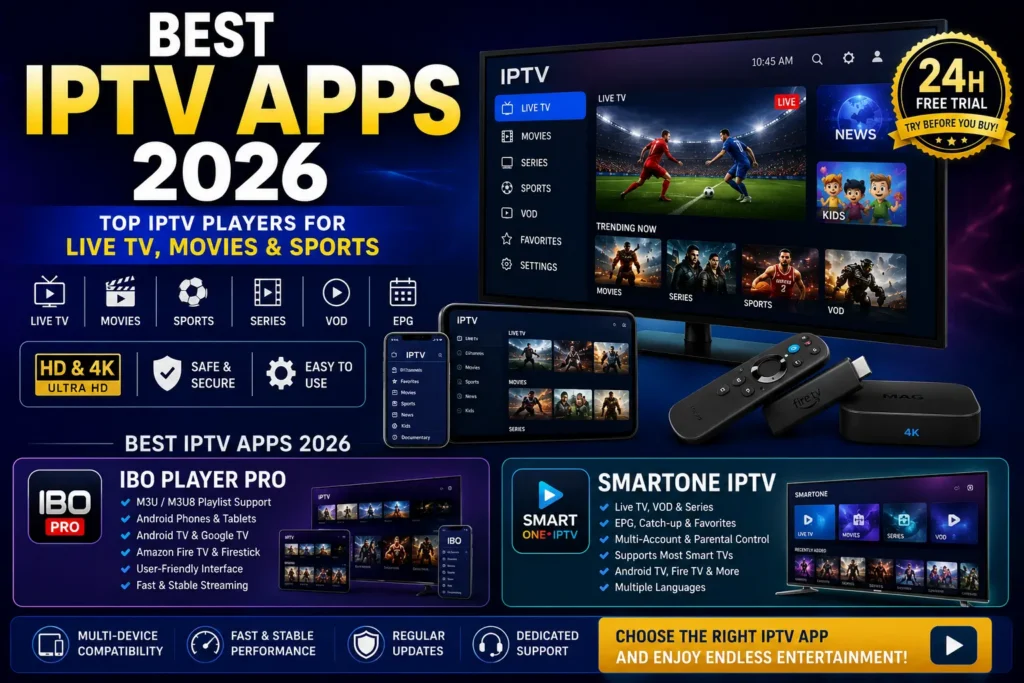
Here are two popular options worth including in a Best IPTV Apps 2026 roundup.
1. IBO Player Pro
IBO Player is a media-player application designed for compatible streaming devices. Its current website lists support for Android TV, Google TV, Amazon Fire TV, and Android phones and tablets. It also supports adding your own M3U/M3U8 content rather than supplying channels itself.
Some of the features users may find useful include:
- M3U/M3U8 playlist support
- Android phone and tablet compatibility
- Android TV and Google TV support
- Fire TV compatibility
- Playlist management
- Video playback controls
- A trial period
- Support for legally obtained content
IBO Player is particularly worth considering if you want a straightforward player for managing an existing playlist. The company states clearly that the application doesn’t include channels, streams, playlists, or subscriptions.
Best for: Users who want a dedicated media player for their own legally obtained IPTV playlists.
2. SmartOne IPTV
SmartOne IPTV is another IPTV player worth considering when comparing the Best IPTV Apps 2026.
According to its official website, SmartOne supports a broad range of platforms, including Samsung and LG Smart TVs, Android TV, Google TV, Amazon Fire TV, Fire Stick, VIDAA, Vestel, and other supported TV platforms.
Its feature set includes:
- Live TV playback
- VOD support
- Favorites
- EPG-related functionality
- Catch-up/TV archive functionality
- Parental controls
- Multiple accounts
- Multi-device support
- Multiple languages
- Advanced video playback controls
- Sports live scores
- Customizable interface options
SmartOne also states that it is a video player and does not provide channels, subscriptions, or streaming content itself.
Best for: Viewers who want a feature-rich player with broad Smart TV and streaming-device compatibility.
IBO Player Pro vs SmartOne IPTV
| Feature | IBO Player Pro | SmartOne IPTV |
|---|---|---|
| IPTV player | ✅ | ✅ |
| Provides channels itself | ❌ | ❌ |
| Playlist support | ✅ | ✅ |
| Android support | ✅ | ✅ |
| Android TV | ✅ | ✅ |
| Fire TV | ✅ | ✅ |
| Smart TV support | Depends on version/platform | ✅ Broad Smart TV support |
| VOD | ✅ | ✅ |
| Favorites | ✅ | ✅ |
| Parental controls | Available | ✅ |
| Multi-language features | Available | ✅ |
| Catch-up/archive | Depends on setup | ✅ |
| Sports scores | — | ✅ |
Which One Should You Choose?
There’s no universal winner because the best IPTV app depends on your device and the features you actually use.
Choose IBO Player Pro if you primarily want a straightforward media player for compatible playlists and you’re using Android, Android TV, Google TV, or Fire TV.
Choose SmartOne IPTV if broad Smart TV compatibility, multiple accounts, favorites, parental controls, catch-up functionality, and additional interface features are important to you.
Remember that neither application should be treated as an IPTV subscription by itself. You’ll need a legitimate content source that you’re authorized to access.
How to Set Up an IPTV App
The exact process depends on the application, but the general workflow is straightforward.
Step 1: Choose a Compatible App
Select an IPTV player that works with your device.
Step 2: Install the Application
Use the official device app store whenever possible.
Step 3: Obtain Legitimate Access
Use the credentials or playlist supplied by your authorized IPTV provider.
Step 4: Add Your Content Source
Follow the app’s instructions to add your playlist, portal, or login details.
Step 5: Load the EPG
If your service provides EPG data, configure it according to the app’s instructions.
Step 6: Test Playback
Try several channels and content categories.
Check:
- Video quality
- Audio
- Channel loading
- EPG
- VOD
- Search
- Favorites
Security and Privacy
Security is an important part of choosing an IPTV application.
Before installing an app, check its:
- Developer
- Reviews
- Permissions
- Update history
- Privacy policy
- Distribution source
Be careful with unknown APK websites. A file that appears to be an IPTV player could contain unwanted software.
Also avoid giving an IPTV application permissions that don’t make sense for its function.
For example, a simple media player shouldn’t need broad access to unrelated personal information.
Keep your operating system and applications updated to reduce security risks.
Legal Considerations
IPTV technology itself is not inherently illegal.
The important issue is the source of the content.
A legitimate provider should have the appropriate rights to distribute the television programs, movies, sports, or other copyrighted material it offers.
Before subscribing or loading a playlist:
- Research the provider.
- Review its terms.
- Check its licensing information where available.
- Avoid services making unrealistic promises about premium copyrighted content.
- Don’t assume an app itself makes every stream legal.
The safest approach is to use IPTV applications with content sources that are properly authorized.
Common IPTV App Problems
Buffering
Buffering can be caused by:
- Weak Wi-Fi
- Network congestion
- Slow broadband
- High stream bitrate
- Provider-side issues
Possible Solutions
Try:
- Restarting your router.
- Moving closer to the Wi-Fi access point.
- Using Ethernet where available.
- Reducing other network activity.
- Lowering stream quality.
App Crashing
If an application repeatedly crashes:
- Restart the device.
- Update the app.
- Clear its cache.
- Check available storage.
- Reinstall the application if necessary.
EPG Not Loading
Check whether your IPTV provider actually supplies EPG information.
If it does, verify that the EPG configuration is correct for your application.
Playlist Not Working
Check:
- Playlist URL
- Username
- Password
- Subscription status
- Internet connection
- Application compatibility
If everything appears correct, contact your provider.
How to Choose the Right IPTV App
Choosing the right IPTV app can sometimes feel confusing, especially when there are so many players available for Android smartphones, Smart TVs, Fire TV devices, and MAG Boxes. The best app for you depends on your device, the type of subscription you have, and the features you want to use.
Instead of spending time testing different applications, contact us first and let our team help you choose the right IPTV app for your device and subscription.
We can help you identify the most suitable option based on whether you’re using an Android smartphone, Smart TV, Firestick, Android TV, or MAG Box. We can also guide you through the setup process so you don’t have to deal with unnecessary trial and error.
Why Contact Us Before Choosing an IPTV App?
Every device can have different requirements. An app that works well on an Android smartphone may not offer the same experience on a Smart TV or MAG Box.
Our team can help you consider:
- 📱 Your device and operating system
- 📺 Your preferred IPTV player
- 🎬 Live TV and VOD requirements
- 📋 Playlist and EPG compatibility
- 🖥️ HD and 4K streaming requirements
- 🔧 Setup and configuration
- 💬 Technical support
Not sure whether IBO Player Pro, SmartOne IPTV, or another compatible player is right for you? Don’t guess—contact us first. We’ll help you find the option that best matches your setup.
Get Help Choosing Your IPTV App
📲 WhatsApp: Contact us on WhatsApp
📞 WhatsApp: +1 619 837 1809
🌐 Website: Visit Floatvesion
🎁 Ask us about our FREE 24-hour trial and let our team help you choose the right setup for your device.
IPTV App Features Comparison
| Feature | Why It Matters |
|---|---|
| Live TV | Watch available channels in real time |
| EPG | View program schedules |
| VOD | Watch available movies and series |
| Favorites | Quickly access preferred channels |
| Search | Find content faster |
| Playlist Support | Connect compatible content sources |
| Subtitles | Improve accessibility |
| Multiple Audio | Useful for multilingual content |
| Casting | Send compatible content to another screen |
| Parental Controls | Help manage suitable content |
Tips for Better IPTV Streaming
For a smoother experience:
- Use a reliable internet connection.
- Prefer Ethernet for fixed devices when practical.
- Keep your app updated.
- Keep your device software updated.
- Avoid overloaded Wi-Fi networks.
- Use a modern streaming device.
- Test compatibility before purchasing a long-term plan.
- Choose authorized content providers.
- Keep your account information private.
Frequently Asked Questions
1. What are the Best IPTV Apps 2026?
The best IPTV app depends on your device, playlist format, desired features, and personal preferences. Rather than choosing based only on popularity, compare compatibility, EPG, VOD, search, favorites, security, and ease of use.
2. Is an IPTV app the same as an IPTV subscription?
No. An IPTV app is generally the player or interface, while an IPTV subscription provides access to content. A player does not automatically grant rights to television channels.
3. Can I use IPTV apps on Android smartphones?
Yes. Many IPTV players support Android smartphones. Compatibility depends on the app, Android version, and content source.
4. Can IPTV apps work on Smart TVs?
Yes, provided the television’s operating system supports a compatible application.
5. What internet speed do I need for IPTV?
HD streaming commonly works best with around 10–15 Mbps or more, while 4K may require 25 Mbps or higher. Actual requirements vary.
6. Why does my IPTV app keep buffering?
Possible causes include poor Wi-Fi, network congestion, insufficient bandwidth, high bitrate, or provider-side problems.
7. Are IPTV apps legal?
IPTV applications are software tools and can be used legally. The legality of the content depends on whether the source has the appropriate rights to distribute it.
8. Can I use one IPTV app on multiple devices?
That depends on the application’s terms and the IPTV service’s subscription rules. Some services may limit simultaneous connections.
9. Do IPTV apps include channels automatically?
Usually not. Many IPTV players require a compatible playlist, portal, or subscription from a content provider.
10. Should I use an APK from an unknown website?
It’s safer to use official app stores or verified developer sources. Unknown APK files can present security risks.
Conclusion
Finding the Best IPTV Apps 2026 isn’t simply about choosing the application with the most features. The right player should match your device, support your legitimate content source, provide a clean interface, and include the tools you actually need.
For live television, EPG support and favorites can be extremely useful. For movies and series, VOD organization and search may matter more. Android users may prioritize mobile performance and casting, while Smart TV and MAG Box users often need remote-friendly navigation.
Most importantly, remember that an IPTV application is usually the player—not the source of the television content itself. Always use content from providers that have the appropriate distribution rights.
With a compatible device, reliable internet connection, trustworthy application, and authorized content source, IPTV can provide a flexible and convenient way to enjoy internet-delivered television.
Ready to Experience IPTV on Your Favorite Device?
🎁 Get a FREE 24-Hour Trial
Explore compatible Live TV, Movies, Sports, Series, VOD, HD & 4K entertainment across supported devices.
📲 WhatsApp: Start a WhatsApp chat
📞 WhatsApp: +1 619 837 1809
🌐 Website: Visit Floatvesion
Test compatibility, explore the available content, and decide whether the service is right for your setup.